
@ubruhin
January 28, 2026
I am very proud to announce the release of LibrePCB 2.0.0 today, after 10 months of hard work! The implementation of a completely new UI with modern technologies marks the beginning of a new era in the history of LibrePCB. But there are also many other improvements and new features, check out the details below.
Highlights
This section showcases only a few of the huge amount of improvements. For a complete list, refer to the full changelog below, which also contains links to the corresponding pull requests on GitHub where additional details and screenshots are provided.
New User Interface (#1494)
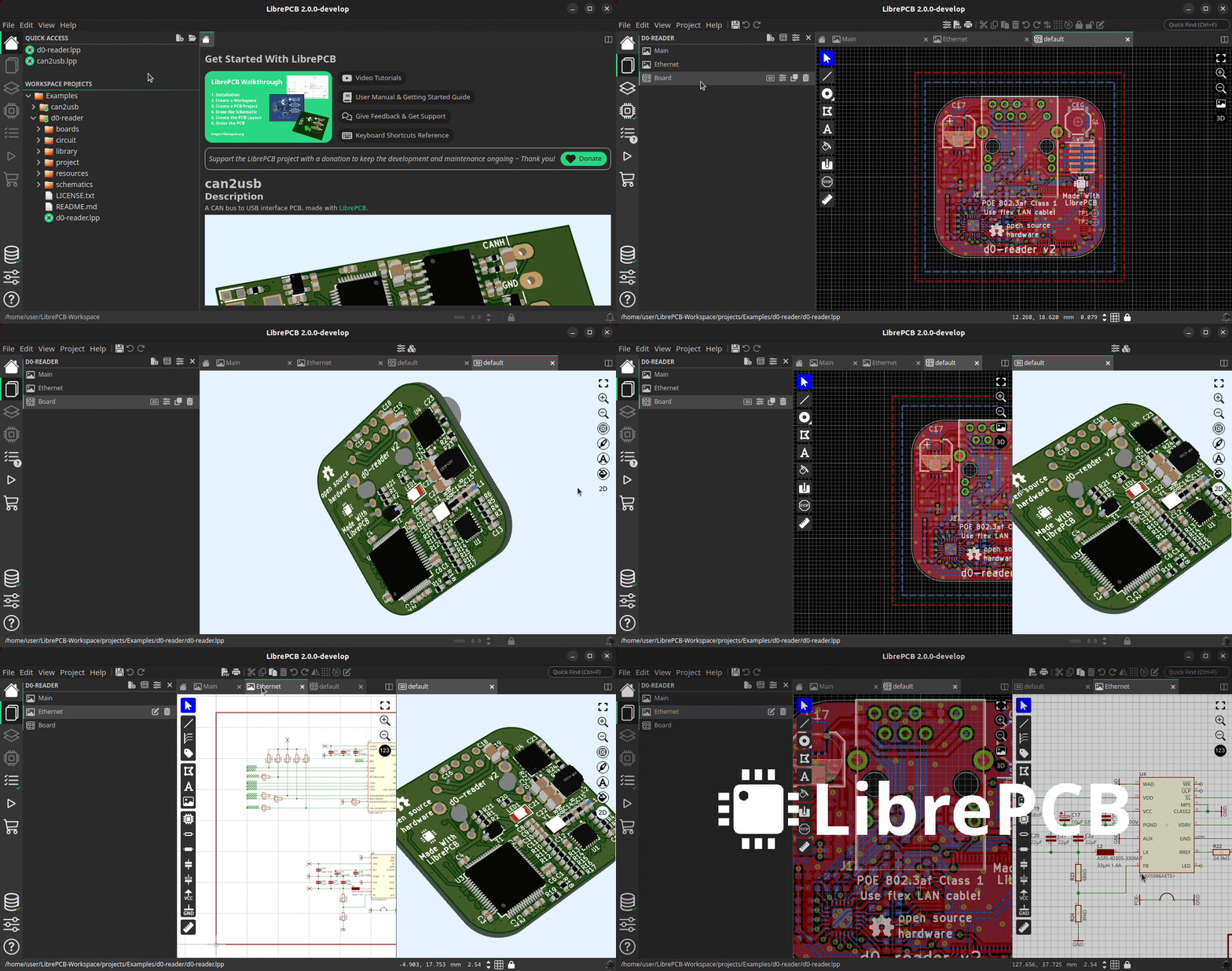
The most obvious change in this release is the new user interface which was built from scratch with the Slint UI framework. It looks very different to the old UI, but the main reason for this change is to improve the user experience and productivity in several ways:
-
Less windows, no more wasting time to switch between multiple windows
-
Less modal dialogs & message boxes which interrupted the workflow
-
Split windows and tabs for organizing the editors according to your needs
-
Efficient use of screen space to maximize schematic/board working areas
-
Clean & simple UI for the simple tasks, but also provide advanced controls when desired
-
Provide hints and guides to make the UI self-explaining
Basically we have replaced 5 separate, single-purpose windows by a single multi-purpose window. In that window you can have as many projects and libraries open as you like, and in every tab you can work on a different task. You can display the board next to its schematic, the 3D board viewer next to the 2D board editor, or compare the schematics of two different projects side-by-side. And on a multi-monitor setup, you can open multiple of those windows which are all equivalent in functionality.
Library Manager
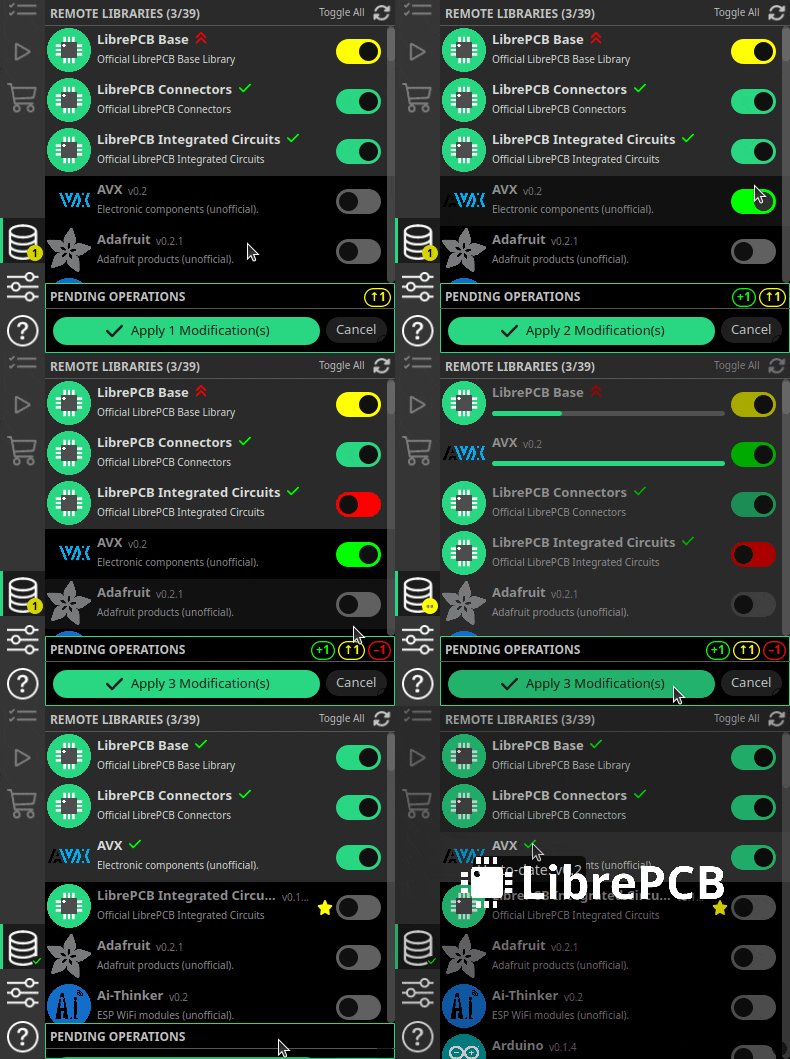
The library manager and the library editor are now also integrated into this new window. The library manager has been rewritten from scratch to heavily streamline the user experience.
The sidebar now even automatically notifies you about outdated libraries, so you don’t miss library updates anymore.
PCB Ordering
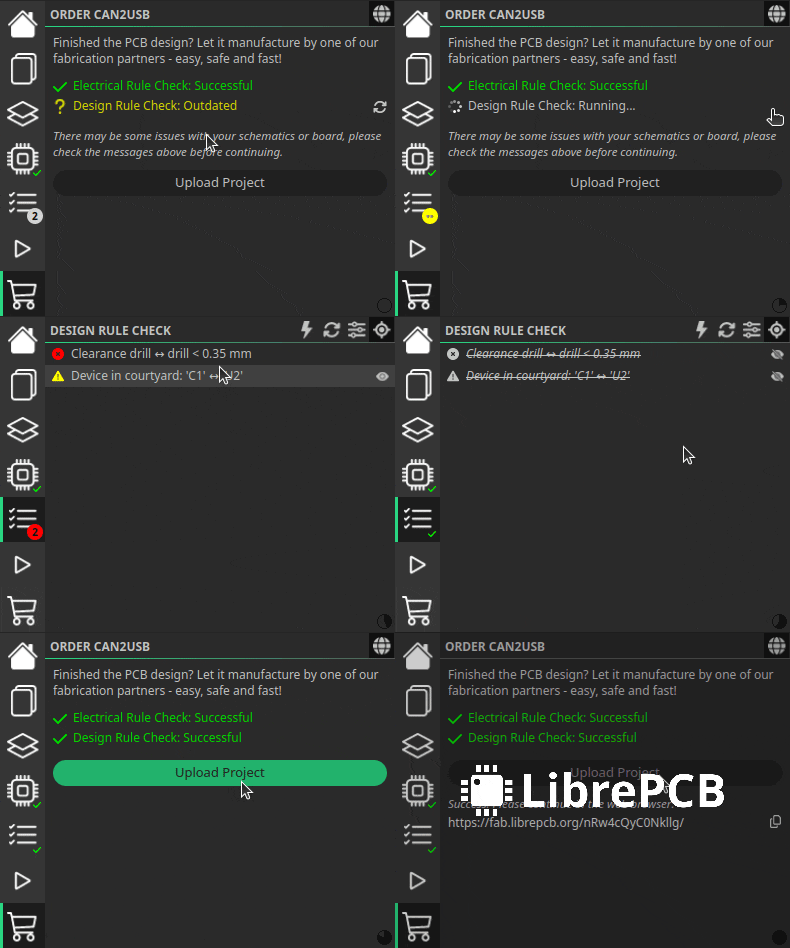
The PCB ordering feature has been rewritten from scratch too and is now integrated seamlessly into the main window.
It now automatically checks the ERC and DRC and warns about outdated DRC messages before you place the order. The days are gone when we ordered faulty PCBs because we forgot to run the DRC!
Enhanced 3D Viewer
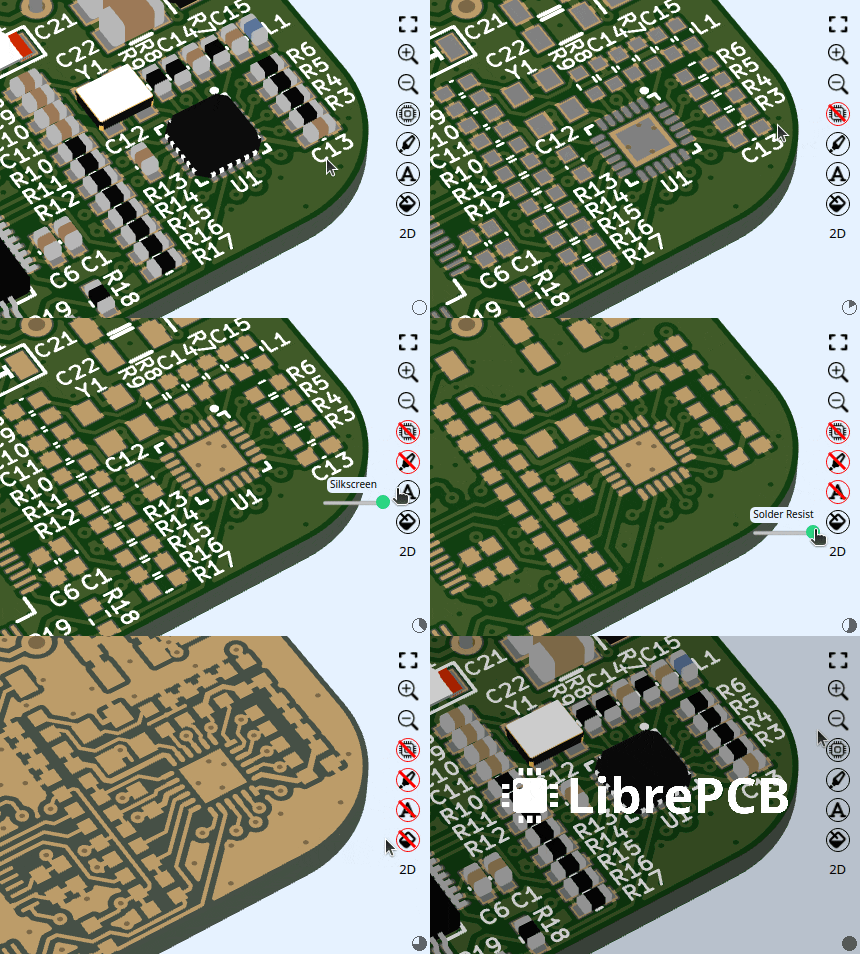
The 3D viewer allows now to hide objects and layers individually to inspect the PCB in every detail. Either just switch those layers on/off with a single click, or use the four sliders to smoothly change their transparency.
|
Please note that the new UI represents a huge step forward, and we’re excited to continue refining and extending it in upcoming releases. We have a clear vision for making the UI even more intuitive and productive, and we’re actively working toward it. We keep track of known limitations & issues of the new UI, and also about the planned short-term tasks. Your feedback is invaluable to us — if you experience any issues or have suggestions not mentioned there, please let us know. |
Schematic Buses (#1646)
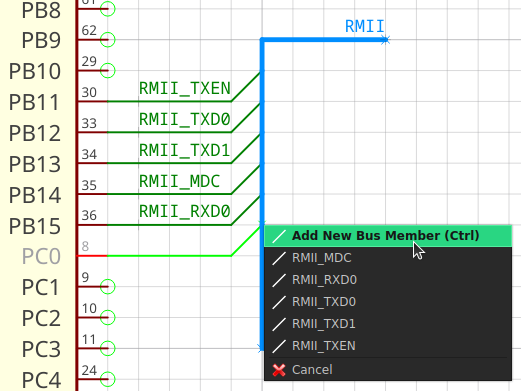
On our user feedback survey, schematic buses are on rank 3 of the most requested features. Now we can remove that feature from the wish list since it has been implemented. All the basic functionlity is there, and more advanced functionality might be provided in upcoming releases. With buses it is possible to group multiple wires in one thick line, called bus, to keep the schematics clean and readable.
Images in Symbols & Schematics (#1578)
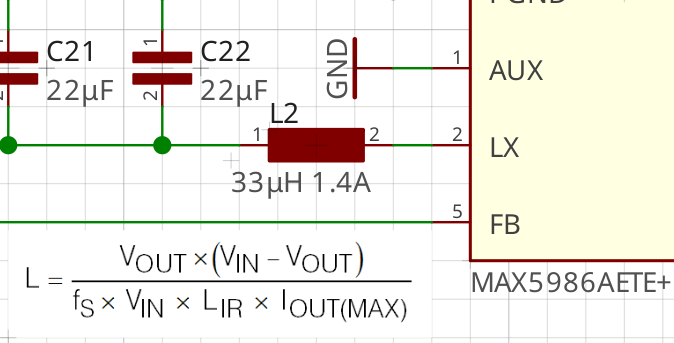
Ever wanted to add a diagram, formula, table or simply a company logo to a schematic? This is now possible — just paste any image from the clipboard into the schematic (or load it from a file) and scale/rotate it as desired. Almost every image format is supported, including SVG, PNG and JPEG.
Individual Pads in Boards (#1596)
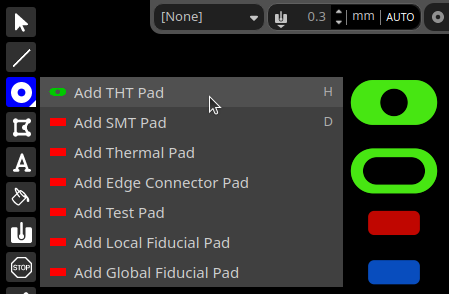
It has always been strange that pads (whether THT or SMT) or plated slots could only be added to a board indirectly as part of footprints, i.e. through the library system — interestingly not only in LibrePCB, but also in other EDA packages.
But sometimes we need individual, specialized pads or slots in boards e.g. for mechanical purposes, where footprints make no sense. In LibrePCB 2.0 this is now possible. Just add pads or slots to the board the same way as in the footprint editor.
Advanced Design Rules (#1610, #1611, #1606, #1608)
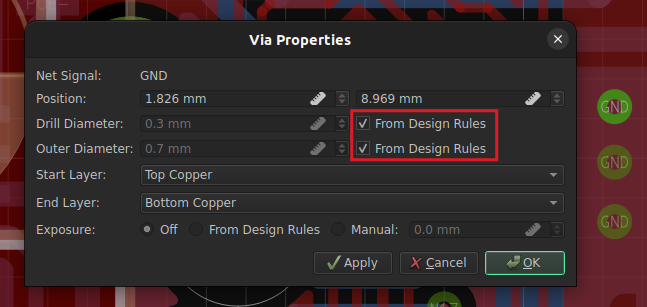
Also noteworthy are some improvements regarding design rules. It is now possible to define the default trace width and via drill diameter in the board settings, so you don’t need to specify those properties anymore when adding traces and vias to the board. And thanks to the automatic via annular ring calculation, you never have to worry about outer via sizes anymore!
In addition, planes allow now to specify separate clearances to copper, board outlines and holes.
Predefined Design Rules & Output Jobs (#1631)
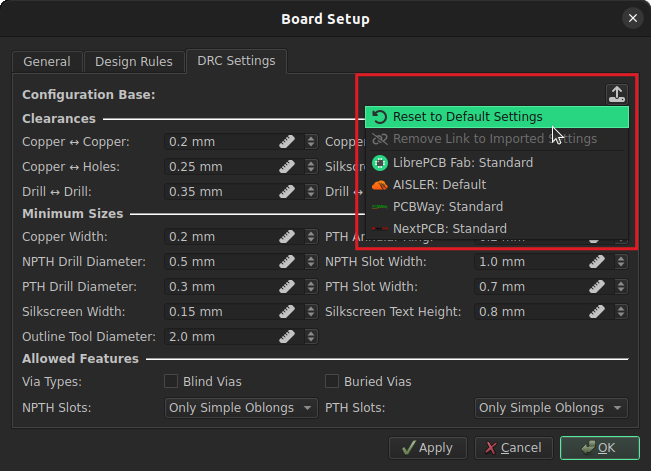
Have you ever entered all design rules according to the capabilities of a particular PCB manufacturer? Probably not, as it is very cumbersome…
With LibrePCB 2.0 it is now possible to store design rules in a library (within so-called organizations), which are then available to be applied to boards. So you can store the design rules of your PCB manufacturer in your local library, and load them into your boards later.
But the real advantage of this approach is that we can now deploy design rules through our library manager! Just install the LibrePCB Base library and you will benefit from the design rules we will add in future.
And this features goes even one step further. In addition to board design rules, it is also possible to share output jobs through this system. So instead of fiddling around with Gerber/Excellon file names in every new project, just load the predefined Gerber/Excellon settings for your PCB manufacturer in a second!
Preferred Footprint Style (#1653)
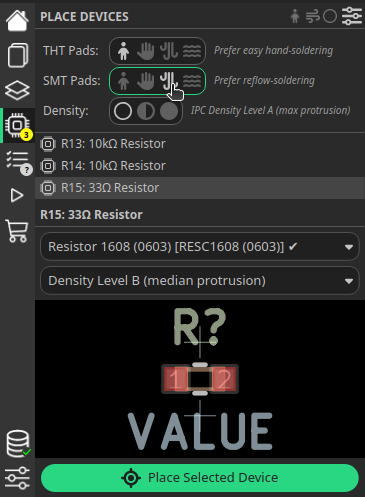
Our library concept already allows a package to provide multiple footprints, for example one for hand soldering and another for reflow soldering. With LibrePCB 2.0, this feature gets especially powerful since you can now specify your preferred soldering technique in the board, so LibrePCB will choose the corresponding footprints automatically.
In addition to the soldering technique, it is also possible to specify the desired IPC density level, which impacts the size of the pads.
Note that this feature relies on so-called 'tags' which need to be added to the footprints in the libraries. Not all our official footprints have those tags yet, so it might take some time until this feature is fully operational.
Upgrading from LibrePCB 1.x
If you’re currently using LibrePCB 1.x, please note that the manual fabrication output dialogs for Gerber/Excellon export and BOM export have been removed in favor of the more powerful output jobs. Use output jobs now to generate any production data. If you used the fabrication output dialog before, you can simply import those settings as a new Gerber/Excellon output job.
|
When you open a LibrePCB 1.x project the first time with LibrePCB 2.x, it will be automatically migrated to a new file format. After saving it, you can no longer open it with LibrePCB 1.x, so please review the project before saving. |
|
When you open a LibrePCB 1.x workspace the first time with LibrePCB 2.x, all libraries will be migrated to the new file format in the background library scan. Therefore it is expected that the first scan takes much longer than usual. |
Changelog
New User Interface:
-
Replace control panel by a new, multi-purpose window (#1504)
-
Integrate library manager into new main window (#1507)
-
Integrate library editor into new main window (#1553)
-
Integrate category editors into new main window (#1556)
-
Integrate symbol editor into new main window (#1558)
-
Integrate package editor into new main window (#1560)
-
Integrate component editor into new main window (#1562)
-
Integrate device editor into new main window (#1564)
-
Integrate schematic- & board editor into new main window (#1520)
-
Integrate Order PCB dialog into new main window (#1521)
-
Integrate About Dialog into new main window (#1505)
Library Editor:
-
Save & restore grid interval in symbols & packages (#1571)
-
Watch for file changes and reload symbols & packages (#1624)
-
Symbol editor: Support locking texts, making them read-only (#1587)
-
Package editor: Support specifying per-package copper clearance (#1616)
-
Package editor: Fix inconsistent solder paste offset calculation (#1670)
-
Component check: Warn about suspicious forced nets (#1509)
-
Fix some properties not copied when duplicating library elements (62d7e33f)
Schematic Editor:
-
Add support for schematic buses (#1646)
-
Support adding images to schematics & symbols (#1578)
-
Support pasting data from symbol editor (#1577)
-
Support snapping objects to grid (#1518)
-
Auto-place schematic frames at coordinate
(0,0)(#1519) -
Show location of selected ERC message (#1582)
-
Automatically simplify net segments (#1592)
-
Hide symbol pins not connected in the component (#1628)
-
Fix polygons not being editable by dragging (#1516)
Board Editor:
-
Support adding individual pads directly to boards (#1596)
-
Support automatic via drill from design rules or net class (#1611)
-
Support automatic via annular ring from design rules (#1606)
-
Support configuring plane clearance to board outline & holes (#1608)
-
Specify default trace width in design rules & net class (#1610)
-
Support configuring preferred footprints in boards (#1653)
-
Select whole device instead of individual pads (#1533)
-
Support displaying a background image (#1574)
-
Automatically simplify net segments (#1591)
-
Support auto-fixing DRC message about empty net segment (#1622)
-
Fix crash after trying to add invalid device to board (5acb0ce7)
Import/Export:
-
Rebuild planes before exporting data which contains copper layers (#1540)
-
Gerber/Excellon: Include plated cutouts in outlines layer (#1625)
-
Gerber/Excellon: Support importing old fabrication settings (#1583)
-
Extend Gerber X3 output job to export glue mask layers (#1585)
-
PDF/image export: Support realistic board renderings (#1570)
-
Reject writing files outside of output directory (#1576)
-
Turn BOM generator dialog into a BOM review dialog (#1579)
-
Remove fabrication output dialog in favor of output jobs (#1539)
-
Eagle import: Add support for lines with flat cap style (#1630)
-
KiCad import: Fix documented compatible KiCad version (45132fe1)
Miscellaneous:
-
Support sharing DRC settings & output jobs via libraries (#1631)
-
Automatically switch to 10x grid when zooming out (#1647)
-
Add 3D view sliders to change transparency of objects & layers (#1522)
-
Support configuring background color of 3D views (#1572)
-
Support configuring API endpoint features (#1601)
-
Always accept decimal point as separator in input fields (#1523)
-
Save file format migration log as
*.htmlin project directory (#1627) -
Add button to manually refresh list of remote libraries (#1618)
-
Cancel library scan before (un)installing libraries (#1657)
-
Provide "clear cache" option after failed libraries rescan (#1651)
-
Maximize window the very first time (#1525)
-
Fix possibly slow 3D scene rebuild (#1623)
-
Fix conflicting keyboard shortcuts on some keyboard layouts (#1642)
-
Fix non-canonical file format of trace & netline anchors (#1590)
-
Fix detection of cohesive net segments (#1589)
-
Fix crash when modifying keyboard shortcuts (#1645)
Building/Packaging/Deployment:
-
Set up code signing of Windows executables & installer (#1549, #1557)
-
Set up automated, signed Apple Silicon builds/releases (#1528, #1675)
-
Make macOS Intel releases compatible down to 10.14 (#1604)
-
Build AppImage with
linuxdeployinstead oflinuxdeployqt(#1502) -
Replace non-reproducible build date by Git commit date (#1550)
-
Generate
*.qmtranslation files into source dir (345d85e9) -
Show in-app notification if runtime resources are missing (#1635)
-
Remove QtQuick test window & dependency (#1499)
-
Remove Qt5 compat module from requirements (d98d461f)
Internal:
-
Prepare file format for overriding minimum DRC settings in net classes (#1613)
-
Prepare file format for disabling glue mask of individual devices (#1588)
-
Prepare file format for locked footprint texts (#1632)
-
Prepare file format for optional device pad connections (#1656)
-
Introduce
settings.user.lpfor projects & schematics (#1617) -
Rename DRC approval keys
useless_viaandantennae_via(#1586) -
Ignore stale schematics/boards during file format upgrade (#1612)
-
Reject file access outside of transactional file system (#1575)
-
Update dependencies
muparser,type_safe,googletest&corrosion(#1506, 516a5c7a, 5f139a07) -
Update bundled fonts (180a41c0)
-
Fix wrong usages of
qBound()(78922cfc) -
Fix copy constructors of
packageckeckmessages.h(3dddf288) -
Fix interactive HTML BOM export panic in debug builds (9e1053f6)
Credits

This release was part of the NGI0 Commons grant we receive from NLnet, which was a huge help for us to get this work done. We are very thankful for their support.
Starting with this release, our executables for Windows and MacOS (ARM64) are signed by OSSign, thanks a lot for their sponsored code-signing.
Also a big thank you to our sponsors and to the community helping us with translations, pull requests, donations and other contributions! 🎉
External code contributors of this release: @z3ugma, @web-coder-of-rpi
Download
The release can be downloaded for all major operating systems from our download page.
If you like LibrePCB, please consider making a small
donation to support the
ongoing development.
Thank you!